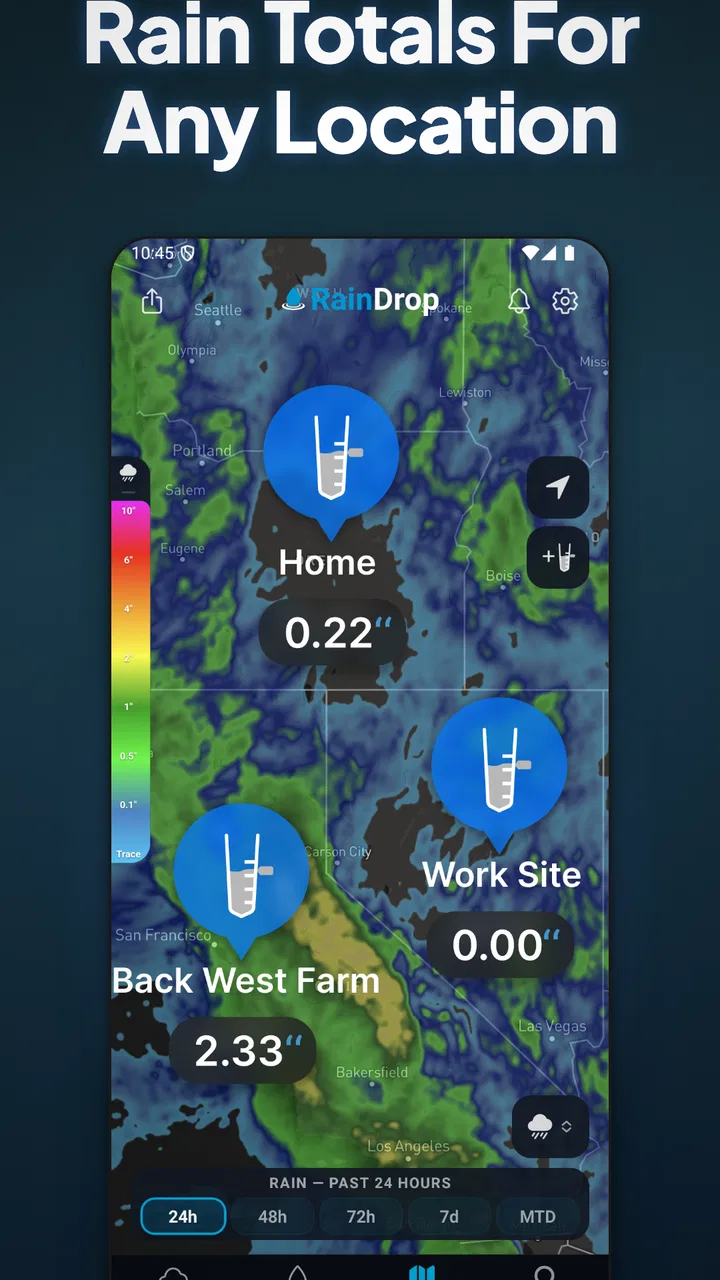
RainDrop: Virtual Rain Gauge
- 4.2
- Rating
- 100.00K
- Installs
- Free
- Price

 Analysis by App-foxy
Rainfall is one of those weather details that sounds simple until you need a dependable answer. A forecast can tell me that rain is likely, but it does not always answer the question I actually have: how much water fell here? RainDrop: Virtual Rain Gauge takes a narrower approach than a full weather suite, focusing on rainfall tracking rather than trying to become my complete source for forecasts, radar, alerts, and climate information.
That focus is both its appeal and its main limitation. I found it most useful when I wanted to build a habit around checking rain totals, especially for gardening, outdoor planning, or simply understanding how wet a particular day was. It is a free weather app from RainDropGauge, available for Everyone, and it has passed the 100K-install mark. Its average rating sits at 3.0 from around 1.7K ratings, which gives a more mixed impression than the simple store summary might suggest.
How I used RainDrop as a daily rainfall tracker
My basic workflow was deliberately uncomplicated. I opened the app when rain was expected, checked the current rainfall information, and returned after the weather changed to see how the total had developed. That makes more sense than treating it like a general-purpose weather dashboard. The app’s identity is built around the rain gauge idea, so the useful question is not “Can this replace every weather app on my phone?” but “Does this make rainfall easier for me to follow?”
You May Also Like

 Blood Strike: 2.5 Anniversary
Blood Strike’s Loadouts Turn Every Drop Into a Tactical Gamble
A close look at Blood Strike’s custom loadouts: how fast access to signature weapons reshapes its battle royale rhythm, rewards preparation, and narrows the gap between fights.

 Pandora - Music & Podcasts
Pandora’s Music Is Easy to Start, but Harder to Recover
Pandora’s strength is its low-effort path from a seed to a station. Its weak spot is how much confidence it asks you to place in connection, setup, and quiet recovery.

 8 Ball Pool
 Is Built on Rivalries, Rematches, and Routine
A close look at the rivalries, rematches, shared routines, and unanswered safety questions that turn a quick pool match into a persistent mobile community.

 Samsung Music
’s Quiet Strength Is Playing What You Already Own
Its reach comes less from spectacle than from dependable access to a personal library. That simplicity is both the app’s strongest retention engine and its ceiling.

 AccuWeather: Weather Radar
AccuWeather Review: A Quick, Clear Forecast for Everyday Decisions
For everyday plans, the best forecast is the one you can understand quickly. AccuWeather makes rain timing, radar, and local conditions easy to act on, with a few trade-offs.

 Hill Climb Racing
Why Hill Climb Racing Still Turns Crashes Into One More Run
A tiny car, a bumpy hill and one more upgrade: Hill Climb Racing keeps resurfacing because its simple chaos makes every near-miss feel personal.
More From Our News Desk
View All News


For a homeowner, the practical value is easy to understand. After a wet day, I might want to decide whether outdoor plants need watering, whether a garden task should wait, or whether a path is likely to remain muddy. A rainfall-focused tool can be more relevant than a long forecast full of temperature, wind, pollen, and sunrise details. I also found the narrow purpose helpful when I wanted a quick check rather than a tour through several weather panels.
A realistic example would be a weekend garden routine. Before watering, I would check whether recent rain had already supplied enough moisture. After a storm, I would look again rather than relying on how heavy the rain felt from indoors. That second check matters because people are poor at estimating rainfall by sound alone: a short, intense shower can feel dramatic, while a long period of light rain may contribute more over time.
The important habit is consistency. I would use the same location and check at roughly similar points in the day, instead of opening the app only when the weather becomes interesting. That creates a more useful personal record in my head and makes the figures easier to compare. The app is not a replacement for a physical gauge when exact on-site measurement is essential, but it can make regular observation much less effort.
What the focused design gets right
The strongest part of the experience is its clear purpose. Many weather apps bury precipitation beneath several layers of information. Here, rainfall is the reason to open the app, so I do not have to mentally filter out unrelated details before deciding what matters. That simplicity is especially welcome for someone who wants a quick rain check rather than a complete meteorological briefing.
It also encourages a better question than “Will it rain?” Forecast language is often binary, but rainfall tracking is about quantity and accumulation. For plants, outdoor work, drainage, and small household decisions, the amount can be more useful than the yes-or-no forecast. I would not make major safety decisions from it, but for ordinary planning it gives rain a more concrete place in my routine.
Another useful insight is that the app works best as part of a two-step weather habit. I use a broader forecast service to decide whether rain is likely, then use this focused tool to follow the rainfall itself. That division of labor is more sensible than demanding that one app handle prediction, observation, alerts, and long-term analysis equally well.
Settings I would check before relying on it
When I install a focused utility, I do not immediately assume the default setup suits me. I first check the location being used and make sure the app is representing the place I actually care about. This is particularly important for rainfall because nearby areas can receive very different amounts during localized showers. A result that looks wrong may be a location issue rather than a problem with the rain estimate.
I would also review the available display and update preferences before making the app part of a routine. The goal is not to change every option, but to remove friction. If the app offers a choice that affects how often information refreshes or how values are presented, I would select the setting that matches my use: occasional checks for gardening, more frequent attention for outdoor work, and a simpler setup for casual curiosity.
There is a practical trade-off here. More frequent updating can make an app feel more current, but it may also demand more attention or resources. I would avoid turning a simple rainfall tool into something I constantly monitor. A deliberate check before watering or after a storm is usually more valuable than repeatedly refreshing throughout the day.
The current version is 3.0.12, and the app runs on Android 7.0 or later. That broad compatibility makes it easier to use on an older Android phone, which is useful if I want to leave a spare device in a kitchen, shed, or home office. At the same time, older hardware can make any weather app feel slower, so I would judge the experience on the phone I actually plan to use rather than assuming every device will behave identically.
Shortcuts and repeatable patterns that save time
The fastest way to use RainDrop is to connect it to an existing habit. I would check it when I make coffee, before leaving for outdoor work, or immediately after a storm passes. This is more reliable than promising myself I will remember to open it later. A rainfall tracker becomes useful through repetition, not through occasional intense attention.
I also like the idea of separating “decision checks” from “curiosity checks.” A decision check answers a specific question: should I water, mow, walk, or postpone a task? A curiosity check is simply looking at what happened. Keeping those purposes separate prevents me from overinterpreting every change and makes the app feel like a tool rather than another stream of notifications competing for attention.
For gardening, I would pair a morning check with a second check after significant rain. The first helps avoid unnecessary watering; the second gives me a clearer sense of what the day actually delivered. For outdoor events, I would use the app as a follow-up monitor, not the sole planning source. I would still consult a forecast for timing, wind, lightning, and the likelihood of conditions changing.
One non-obvious advantage of this approach is that it can expose the difference between forecast confidence and actual rainfall. A forecast may predict rain, but the tracked result can remind me that probability does not equal quantity. Over time, that helps me make more realistic personal decisions, especially if I tend to cancel plans whenever rain is mentioned or water plants whenever the sky looks dark.
Where the virtual gauge reaches its limits
The word “virtual” deserves attention. I would not treat this as a physical instrument sitting in my garden and directly collecting water. Its usefulness depends on the information available to the app and the relevance of that information to my location. A nearby weather source can be representative, but it cannot capture every difference between one street, field, hillside, or garden.
That limitation matters most during highly localized showers. If rain falls heavily on one side of town and barely touches another, a generalized reading may not match what I see outside. For casual planning, that may be acceptable. For irrigation records, agricultural decisions, drainage studies, or any situation where exact on-site measurement matters, I would choose a physical rain gauge or a more specialized monitoring setup instead.
I would also avoid using the app as a severe-weather authority. Rain totals are not the same as warnings, storm tracking, flood guidance, or lightning information. If safety is involved, I would consult official alerts and a comprehensive weather service. RainDrop’s narrow purpose is a strength for simple tracking, but it becomes a weakness when I ask it to cover hazards outside that purpose.
The mixed rating is worth keeping in mind. An average of 3.0 from around 1.7K ratings suggests that the experience will not satisfy everyone equally. Some users may want a more polished all-in-one weather product, while others may expect a virtual reading to match a personal gauge exactly. I think those expectations explain why it is important to understand the app’s role before installing it.
Free access and the purchase question
RainDrop can be installed for free, which makes it easy to test without committing money first. There are in-app purchases ranging from $2.99 to $149.99 per item, so I would pay close attention to any purchase screen and consider whether the extra value matches my actual use. A casual user who only wants occasional rainfall checks should not assume that every optional purchase is necessary.
My advice would be to establish a routine with the free experience before spending anything. If the app already answers the questions I have, paying may not improve the core habit. If I need additional capabilities presented inside the app, I would evaluate them individually rather than treating the highest-priced option as automatically better. The wide purchase range is a reason to be deliberate, not a reason to dismiss the app outright.
This is also where RainDrop compares differently with the usual alternatives. A general weather app may offer more information in one place and could be better for forecasts, radar, warnings, and hourly planning. A physical gauge may be better for measuring the exact water that fell on my property. RainDrop sits between those choices: more focused than a broad weather app, but less direct than a sensor placed at home.
Who should use it, and who should skip it
I would recommend trying it if you want a simple way to pay attention to rainfall totals, especially for household routines, plant care, or post-storm checks. It is also a reasonable option if your phone runs an older version of Android and you want a focused tool rather than a demanding modern weather suite. The Everyone age rating makes it suitable for a broad audience, including families who want to make weather observation part of a daily routine.
I would skip it if I need a single app for every weather need. People who depend on detailed radar, storm warnings, marine conditions, aviation information, or highly localized professional measurements should look elsewhere or use RainDrop only as a secondary reference. I would also skip it as a primary tool for scientific or agricultural record-keeping unless its readings are independently checked against a physical gauge.
Another group that may be disappointed is anyone expecting the app to make rainfall completely effortless without any personal routine. The value comes from returning to it at useful moments and interpreting the result in context. If I only open a weather app when I need a forecast for the next hour, a rainfall tracker may feel too narrow.
My verdict after building a repeatable routine
RainDrop: Virtual Rain Gauge is a specialized weather app with a sensible core idea: give rainfall more attention than it usually receives in a crowded forecast screen. I like it most when I use it as a focused companion—forecast elsewhere, rainfall tracking here, personal decisions based on both. That workflow feels more honest and more useful than asking a virtual gauge to replace every other weather source.
Its limitations are equally clear. It should not be confused with a physical gauge, a severe-weather service, or a full forecasting platform. The mixed 3.0 average also tells me to keep expectations realistic, particularly if I want a highly polished or comprehensive experience. The free entry point makes testing straightforward, while the optional purchases mean I would review costs carefully before upgrading.
After using it, my recommendation is conditional but positive: choose RainDrop if rainfall totals are the specific weather detail you want to follow. Build it into a small habit, verify the location, use broader tools for forecasts and warnings, and compare important readings with a physical gauge. Used that way, RainDrop is a practical specialist rather than an all-purpose weather replacement, and that distinction is exactly what makes it worthwhile for the right person.
FAQs for RainDrop: Virtual Rain Gauge
01What is RainDrop: Virtual Rain Gauge used for?
RainDrop: Virtual Rain Gauge is designed to help users track and measure rainfall in their area accurately. By using this app, users can monitor precipitation levels, receive real-time weather updates, and plan their activities accordingly. It's an ideal tool for gardeners, farmers, and outdoor enthusiasts who rely on precise weather data.
02How accurate is the rainfall data provided by RainDrop?
RainDrop utilizes advanced meteorological data and integrates with local weather stations to provide highly accurate rainfall measurements. While it's designed to be reliable, users should note that extreme weather conditions or technical issues at data sources may occasionally affect accuracy. However, updates ensure that data remains as precise as possible.
03Is RainDrop compatible with all devices?
The app is available for both Android and iOS devices and is optimized for a wide range of smartphones and tablets. However, it's important to check the app store compatibility notes to ensure your device's operating system is supported. Regular updates are released to enhance compatibility with new devices.
04Does RainDrop require an internet connection to function?
Yes, RainDrop requires an active internet connection to download the latest weather data and updates. While some basic features may work offline, such as previously downloaded data, real-time updates and notifications are only available when connected to the internet. This ensures users receive the most current information.
05Are there any subscription fees for using RainDrop?
RainDrop offers a free version with basic features, but a premium subscription is available for users who want access to advanced functionalities, such as detailed historical data and customizable alerts. Subscription fees are used to maintain and improve the service, and users can choose monthly or yearly plans based on their needs.
Pros
- Accurate rainfall data in real-time.
- User-friendly interface with intuitive design.
- Customizable alerts for specific locations.
- Integrates well with other weather apps.
- Low battery consumption during use.
Cons
- Requires constant internet connection.
- Limited free features; premium needed for full access.
- Occasional delays in data updates.
- No offline mode for remote areas.
- Ads can be intrusive in the free version.

RainDrop: Virtual Rain Gauge
Gallery